Coloring Book Workflow FAQ: 12 Common Questions Answered
Coloring Book Workflow FAQ: 12 Common Questions Answered
Publishing a coloring book on Amazon KDP requires more than just creating illustrations. It involves niche research, design creation, technical formatting, and strategic publishing. The adult coloring book market is worth over $300 million annually on Amazon, with top books earning $5,000–$15,000 per month. AI tools have simplified the process, cutting design time from weeks to minutes and reducing costs significantly. However, success depends on meeting technical standards, maintaining design consistency, and targeting the right audience.
Key Points to Know:
- Niche Selection: Focus on specific themes like "Kawaii Sushi" or "Gothic Cathedral Stained Glass" to stand out.
- Design Tips: Use AI to generate designs but ensure they meet 300 DPI resolution and maintain consistent line weights.
- File Preparation: Submit print-ready PDFs with proper bleed, margins, and formatting for Amazon KDP.
- Pricing: Most coloring books sell for $8.99–$12.99, depending on page count and quality.
- Marketing: Use Amazon keywords, categories, and customer reviews to optimize visibility and sales.
The article provides actionable advice on every step, from planning and designing to publishing and marketing, ensuring your coloring book meets professional standards and appeals to your target audience.
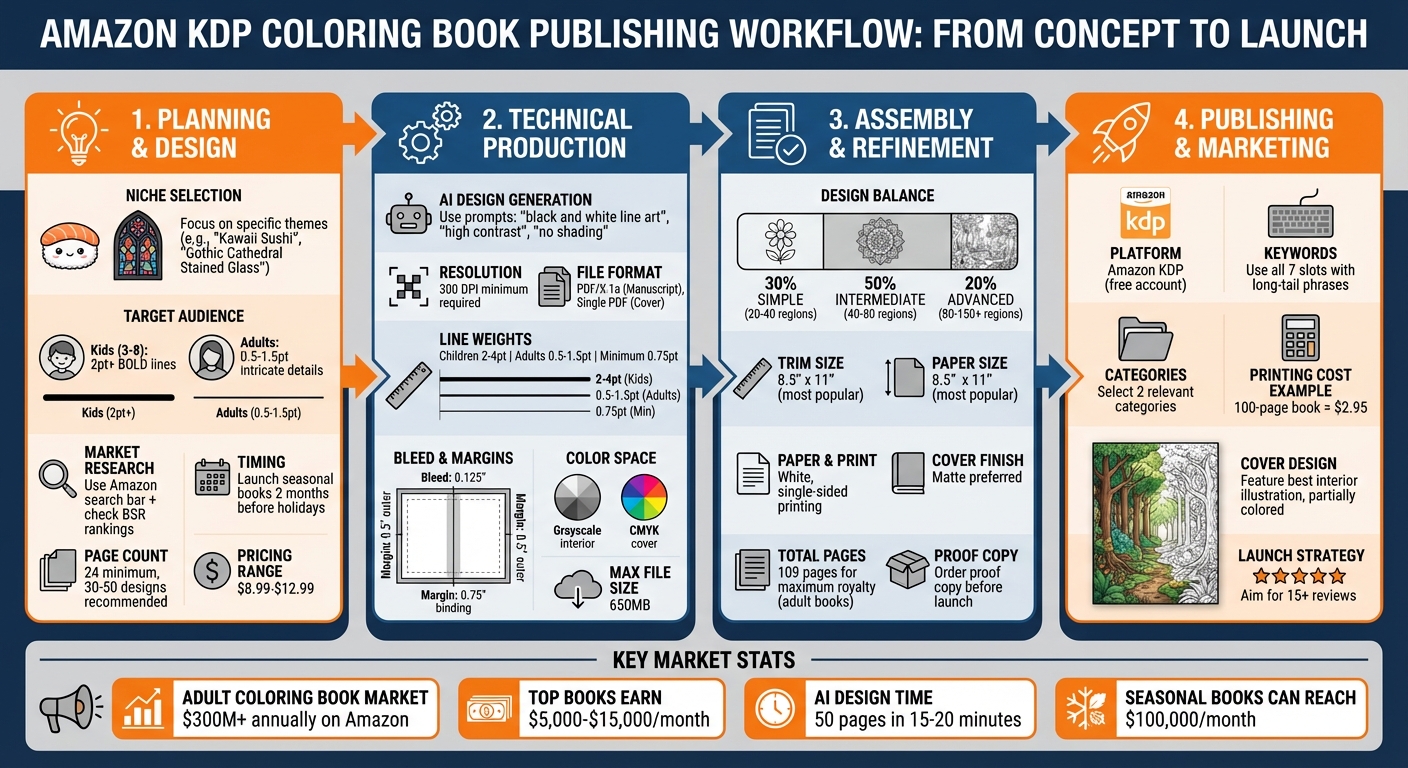
Complete Coloring Book Publishing Workflow: From Design to Amazon KDP Launch
Planning and Design: Starting Your Coloring Book Project
How to Pick a Theme and Target Audience
Choosing the right theme is the first step in creating a coloring book that stands out. Instead of going broad with generic themes like "Animals", focus on a specific niche, such as "Kawaii Sushi Coloring Book for Teens" or "Gothic Cathedral Stained Glass". This approach makes your book easier to discover and helps you carve out a loyal audience within a smaller, more dedicated market.
When designing, keep your target audience in mind. For younger kids (ages 3–8), bold lines (2pt or thicker) and simple shapes work best. Adults, on the other hand, often prefer intricate designs with finer details. There’s also a growing demand for books tailored to seniors, who may appreciate therapeutic designs with high contrast and simplified patterns. Mixing different complexity levels in one book can lead to dissatisfaction, so stick to a single audience per project.
To refine your theme and understand market demand, use Amazon’s search bar as a free research tool. For example, typing "adult coloring book a…" will show auto-suggestions based on what people are actively searching for. Check the Best Sellers Rank (BSR) of top results to gauge sales potential, and dive into customer reviews to identify gaps or opportunities in existing books.
If you’re considering seasonal themes, timing is everything. Launch books like Halloween-themed ones about two months ahead of the holiday to maximize sales. These seasonal titles can generate impressive revenue - some even reach $100,000 per month. Keep in mind that print-on-demand coloring books generally need at least 24 pages, though most professional collections include 30–50 unique designs. Pricing your book between $8.99 and $12.99 tends to work well across various niches.
"The narrower your niche, the easier it is to dominate." – BooksGenie.ai
Once you’ve nailed down your theme and audience, you can use AI tools to streamline the design process.
Using AI Tools for Design and Concept Work
AI tools can significantly simplify the design process, but success depends on how you craft your prompts. Use precise language with technical keywords like "black and white line art", "high contrast", "no shading," and "clean single-pixel vector-like strokes" to ensure the designs are easy to color. Negative prompts are equally important; include terms like "no shadows", "no gradients", "no color," and "no darkened areas" to keep the white spaces clean and open for coloring.
Consistency is key. If you’re working on a Kawaii-themed book, include "Kawaii style" in every prompt along with your technical specifications. For adult-oriented designs, use phrases like "intricate details", "complex patterns," or "fine lines" to maintain a cohesive look throughout the book.
Most AI-generated images are raster files, which may require some cleanup. Converting these to vector format (SVG) ensures the designs stay sharp and meet the 300 DPI resolution needed for professional printing. Before finalizing, print a few test pages at home to check line quality and ensure the designs work well with crayons or markers.
Once your designs are polished, it’s time to focus on the layout and printing details.
Page Layout and Design Principles
With your theme and designs ready, follow these layout principles to ensure your coloring book looks professional. Always use pure black (#000000) for the lines to achieve a crisp and defined appearance. Adjust the line thickness based on your audience: thicker lines (2–4pt) suit children, while thinner lines (0.5–1.5pt) are better for detailed adult designs. Make sure all shapes are fully enclosed to prevent colors from bleeding into unintended areas.
Spacing is crucial. Leave at least 0.25 inches between design elements, 0.5-inch outer margins, and 0.75-inch binding margins to protect the artwork. For best results, design for single-sided printing - place coloring pages on the right-hand (odd-numbered) pages and leave the backs blank to avoid marker bleed-through.
Aim for variety in complexity across your pages. A good balance is:
- 30% simple designs: 20–40 large regions, 3–5 inches each
- 50% intermediate designs: 40–80 medium regions, 1–3 inches each
- 20% advanced designs: 80–150+ small regions, 0.25–1 inch each
Stick to standard printing guidelines for trim size - 8.5" x 11" works well for both children’s and adult coloring books. If your artwork extends to the edge of the page, include a 0.125-inch bleed on all sides. Use white paper to ensure colors pop and maintain vibrancy.
Technical Production: Creating Print-Ready Files
File Formats and Print Specifications
When submitting your manuscript to Amazon KDP, it’s important to follow their specific file requirements. For designs that include bleed, your manuscript must be uploaded as a single PDF file. If your book doesn’t include bleed, KDP also accepts DOC or DOCX files, but these will be automatically converted to PDF before printing. Your book cover, however, must always be submitted as one continuous PDF, encompassing the back cover, spine, and front cover.
To ensure sharp print quality, all images should have a resolution of at least 300 DPI. Exporting your files in the PDF/X-1a format is recommended, as it aligns with KDP’s standards. Be sure to disable any downsampling during the export process to maintain the required 300 DPI resolution.
For the interior pages, set them to grayscale (black and white), while your cover should use the CMYK color space for accurate color reproduction. Additionally, make sure to flatten transparencies, embed all fonts and images, and remove any crop or trim marks to avoid printing errors. Keep the final file size under KDP’s 650MB limit.
| Specification | Requirement |
|---|---|
| Minimum Resolution | 300 DPI |
| Maximum File Size | 650MB |
| Minimum Line Weight | 0.75 point (0.01" / 0.3mm) |
| Bleed Margin | 0.125" (3.2mm) |
Converting AI-Generated Designs to Vector Graphics
Once your print-ready files are prepared, you may need to convert AI-generated raster images into vector graphics. Raster images, made up of pixels, can lose quality when resized. By converting them to vector format (SVG), you ensure that lines stay sharp at any size. The process typically includes three steps: generating the design with AI, converting the raster image to vector using an AI vectorizer, and refining the results in software like Inkscape or Adobe Illustrator.
For children’s books, adjust the vectorizer settings to "Low" detail, "Heavy" line thickness, and "High" corner smoothing. These settings create bold, simple shapes that are easier to color. On the other hand, for adult coloring books with intricate designs, use "High" detail preservation, "Medium" line smoothing, and enable the "Remove Speckles" option. This helps retain fine details while cleaning up any unwanted artifacts.
After vectorizing, open the file in Inkscape or Adobe Illustrator. Use the "Simplify Path" function to reduce unnecessary nodes and streamline the design. Zoom in to 100% to inspect the artwork for stray pixels or interruptions. Maintain a minimum line weight of 0.5pt for fine details and 1–2pt for standard outlines to ensure the designs print clearly.
"AI speeds up bulk page generation, but crisp, consistent line art and careful layout planning make printable books sellable." – Billie Lucas, Author, BookAutoAI
Once your designs are polished and vectorized, you’re ready to standardize and process the pages for assembly.
Batch Processing for Multiple Pages
To streamline the production of multiple pages, start by creating a standardized template that matches your book’s trim size (e.g., 8.5" x 11"). Include preset bleed (0.125"), margins (0.5" to 0.75"), and gutter specifications to ensure proper alignment during assembly. Naming your files systematically (e.g., BookTitle_001.png) will help maintain the correct page order and make bulk imports more manageable.
When using AI to generate multiple pages, stick to a consistent prompt list with style keywords like "clean line art" and "high contrast." This ensures uniformity in line weights and design complexity across all pages, especially for books with 30 to 50 illustrations. Before assembling the final product, review each page at 100% zoom to confirm consistent stroke weights and remove any stray pixels or noise.
Finally, use file merging software to combine individual high-resolution PDFs into one PDF/X-1a compliant file for publishing. Ordering a physical proof copy is a smart move to confirm that line weights, margins, and other details translate accurately from the digital file to the printed page.
Refining and Assembling Your Book
Maintaining Style Consistency Throughout Your Book
To give your book a polished and professional look, it's essential to maintain a consistent visual style across all pages. Using a master prompt with style keywords like clean line art, high contrast, and no shading can help achieve this uniformity. Buyers expect a cohesive experience, so sticking to one dominant style - whether it's Kawaii, Mandala, or Art Nouveau - is crucial. Mixing styles can confuse your audience and lead to negative feedback.
When refining your pages, ensure that stroke widths are consistent. For children's books, use bold lines of at least 2pt for main elements, while adult coloring books typically feature finer lines between 0.5pt and 1pt. To ensure everything matches, review each page at 100% zoom and check for any inconsistencies in line weight or detail density.
Design consistency also extends to layout elements. Use the same border styles across all pages, stick to 1–2 fonts for any text, and keep background treatments uniform. Additionally, ensure there’s at least 0.25" of space between lines to leave enough room for coloring. Once your design is consistent, you can follow a proven publishing workflow and shift your attention to selecting the right materials for production.
Paper and Binding Options: Selecting Materials
The materials you choose play a big role in how your book looks and feels. White paper is the standard for interiors because it ensures colors applied by users stay vibrant and true. Most coloring books use single-sided printing, where designs are printed only on the right-hand (odd-numbered) pages, leaving the backs blank. This prevents markers from bleeding through and ruining the next design.
For sizing, the most popular trim size is 8.5" x 11", which works well for both adult and children's books. Square formats, like 8.5" x 8.5", are a favorite for mandala designs and are also great for social media-friendly layouts. These technical print specifications ensure your refined artwork translates seamlessly to print.
| Trim Size | Best Use Case | Platform Compatibility |
|---|---|---|
| 8.5" x 11" | Standard adult and children's books | KDP, Etsy, Digital (US Letter) |
| 8.5" x 8.5" | Mandalas and social-media-friendly designs | KDP, Etsy |
| 8" x 10" | Premium feel for specialized art | KDP |
| 6" x 9" | Travel-sized or "pocket" coloring books | KDP |
When it comes to the cover, a matte finish is often preferred for coloring books. Before launching, always order a physical proof copy to ensure that line weights, margins, and paper quality meet your expectations.
Mixing Simple and Complex Designs
Once your materials and layout are finalized, focus on balancing your content with a mix of simple and intricate designs. This variety keeps your book engaging and caters to users with different skill levels and time availability. A well-rounded coloring book typically includes 30–50 designs to provide great value. For adult coloring books, aiming for 109 pages is recommended to maximize royalty potential on platforms like KDP.
Alternate between full-page intricate designs and simpler patterns to give users choices that suit their mood or skill level. Children's books (ages 3–8) should feature low-detail designs with large spaces, while adult books can include high-complexity patterns like mandalas or nature-themed illustrations. When organizing your final PDF, include a title page, copyright page, your 30–50 main designs, and optional back matter for credits or promotional content.
sbb-itb-c02bfb4
Publishing and Marketing: Launching Your Coloring Book
Publishing on Amazon KDP
Once your designs and technical details are finalized, the next big step is publishing through Amazon KDP. Start by creating a free KDP account and entering all your book's metadata - this includes the title, author name, description, and keywords. Make sure to fully utilize all seven keyword slots with long-tail phrases like "coloring book for mindful meditation" to improve your book's visibility. Additionally, select two categories that best match your book's theme to help readers find it more easily.
When uploading your files, ensure your interior is a single PDF with a resolution of at least 300 DPI. Your cover should also be a single PDF, formatted to include the front, spine, and back, and it must use CMYK color mode. Keep in mind that spine text will only appear on books with 79 or more pages. Before submitting, use the KDP Print Previewer to check for any issues, such as margin errors, spine misalignment, or low-resolution images. This tool will flag potential problems, so take the time to review everything carefully.
Pricing is another key consideration. Printing costs vary depending on the page count. For example, an 8.5" x 11" black-and-white coloring book with 100 pages costs about $2.95 to print. Typical pricing for a 50-page book ranges from $6.99 to $8.99, while 100-page books often do well in the $8.99 to $12.99 range. To ensure your file quality and overall presentation, always order a proof copy before launching.
Designing a Professional Book Cover
Your book cover is your first opportunity to grab a potential buyer's attention - especially at thumbnail size. A great way to showcase your book's content is by featuring one of your best interior illustrations on the front cover. To make it pop, consider partially coloring the design. This not only highlights the book's potential but also makes it stand out in search results.
While creativity matters, meeting technical requirements is just as important. Keep all critical elements - like text and key visuals - at least 0.25 inches away from the trim edges to accommodate production variances. Avoid thin borders near the edges, as even a small 0.125-inch shift during printing can make them look uneven or cut them off entirely. A matte finish is often preferred for coloring books, as it gives a polished, sophisticated feel.
"A cover is the first sales tool; if you don't want to design one from scratch, an auto cover generator can save time while keeping spine dimensions accurate." - Billie Lucas, Author, BookAutoAI
Once your cover is ready, you can turn your attention to identifying niche markets where your book can thrive.
Finding Profitable Niche Markets
Success in the coloring book market often comes down to finding the right niche. Instead of creating a generic coloring book, focus on specialized themes that cater to specific interests, like "Gothic Cathedral Stained Glass Patterns for Adults". By combining consistent design quality with a targeted theme, you can appeal to audiences that value attention to detail. The adult coloring book market on Amazon alone generates over $300 million annually, with some individual books earning between $5,000 and $15,000 in monthly royalties.
To discover promising niches, use Amazon's search bar to explore suggested searches and study the "Best Sellers" lists to understand what customers are actively buying. Tools like KDPSpy can also help you analyze sales rankings and estimate potential revenue for specific niches. Some of the current trends include Bold and Easy designs for beginners, Stress Relief and Mindfulness themes featuring mandalas, and highly specific categories like Kawaii-themed coloring books.
Timing can also play a big role in your book's success. For seasonal themes, aim to launch about two months before the event. For instance, releasing Christmas-themed books in October gives them time to build visibility and relevance. To boost your book's credibility, try to gather at least 15 reviews, and include 30–50 unique designs to enhance its perceived value and support higher price points.
How to Make a Coloring Book & Sell on Amazon in Minutes (Full Walkthrough for Beginners)
Conclusion
Publishing coloring books successfully demands careful planning, technical precision, and smart use of AI. Every step, from researching your niche to uploading the final PDF on KDP, plays a critical role. A streamlined workflow ensures your designs meet technical standards, like maintaining consistent line weights (1–2pt), while modern AI tools vs. traditional methods can dramatically speed up the creative process.
With AI, you can generate 50 themed pages in just 15–20 minutes, a task that would take significantly longer manually. However, speed alone isn’t enough - quality is essential. Using prompts such as "clean line art" and "high contrast" can help produce sharper results. Always inspect your work at 100% zoom to catch stray pixels or broken lines before finalizing your files.
"AI speeds up bulk page generation, but crisp, consistent line art and careful layout planning make printable books sellable." - Billie Lucas, Author
Tools like Coloring Book Engine handle technical aspects like DPI, bleed, and margins, allowing you to focus on creativity and market strategy. This efficient production process not only saves time but also ensures high-quality results - key to standing out in a competitive market. The BYOK model offers cost control over AI usage, while the desktop tool keeps your projects private and workflow steady, free from subscription fees or cloud reliance.
The market for coloring books is substantial. The adult coloring book niche alone generates over $300 million annually on Amazon, with creators earning thousands in monthly royalties. The formula for success lies in targeting specific audiences and maintaining professional standards throughout the production process. With the right tools and approach, you can create a scalable, sustainable publishing business that delivers real value to coloring enthusiasts.
FAQs
How can AI tools help me create better coloring book designs?
AI tools make it easier than ever to turn your ideas into professional-quality coloring book pages. With AI art generators, you can create themed illustrations in just minutes using prompts like "simple line art for kids" or "detailed mandala patterns for adults." These tools don’t just create; they also refine. They can sharpen outlines, enhance contrast, and clean up any unwanted elements, ensuring your designs meet publishing standards, like a crisp 300 dpi resolution.
After your illustrations are complete, AI vectorization tools step in to convert them into scalable vector files. These tools can also handle batch adjustments, such as setting margins, adding bleed, and formatting files for publishing. This streamlined process minimizes tedious manual work, letting you focus on the creative side of things and producing polished, cohesive designs ready for platforms like Amazon KDP.
What are the key technical requirements for publishing a coloring book on Amazon KDP?
To publish a coloring book on Amazon KDP, it's essential to follow a few key technical guidelines:
- Interior file: Prepare a high-quality PDF with images at 300 dpi resolution. Make sure to include proper margins and bleed, and ensure the file matches your chosen trim size.
- Cover file: Design a cover that fits Amazon KDP’s specifications, including the correct spine width and trim size. You can upload it as a single PDF or provide separate files for the front, back, and spine.
- Formatting rules: Double-check that your page count, file size, and layout align with KDP’s paperback publishing standards.
Meeting these requirements will help your coloring book pass KDP’s checks and avoid unnecessary delays in the publishing process.
How can I choose a profitable niche for my coloring book?
To pick a niche that can bring in steady income, start by blending your personal interests with what the market wants. Jot down topics you’re passionate about or have expertise in, then dig into their popularity using tools like Amazon’s best-seller lists or keyword research platforms. Look for niches that have solid search volume but fewer competing titles - this often signals an opportunity in an underserved area.
Stick to timeless themes such as mandalas, animals, floral patterns, or inspirational quotes, as these tend to sell consistently well. At the same time, keep an eye on trending categories like mindfulness or quirky, humorous designs for adults. A niche that matches both your passions and market demand is more likely to thrive.
Before fully diving in, test your idea by creating a handful of sample pages (5–10) and formatting them to fit KDP’s standard dimensions (e.g., 8.5 × 11 inches). Use these pages to gather feedback or even run small ad campaigns to measure interest. If the response is encouraging, you’ve probably discovered a niche that can bring in reliable royalties.