Fix Fuzzy AI Line Art for Print: Sharpen Lines at 300 DPI
Fix Fuzzy AI Line Art for Print: Sharpen Lines at 300 DPI
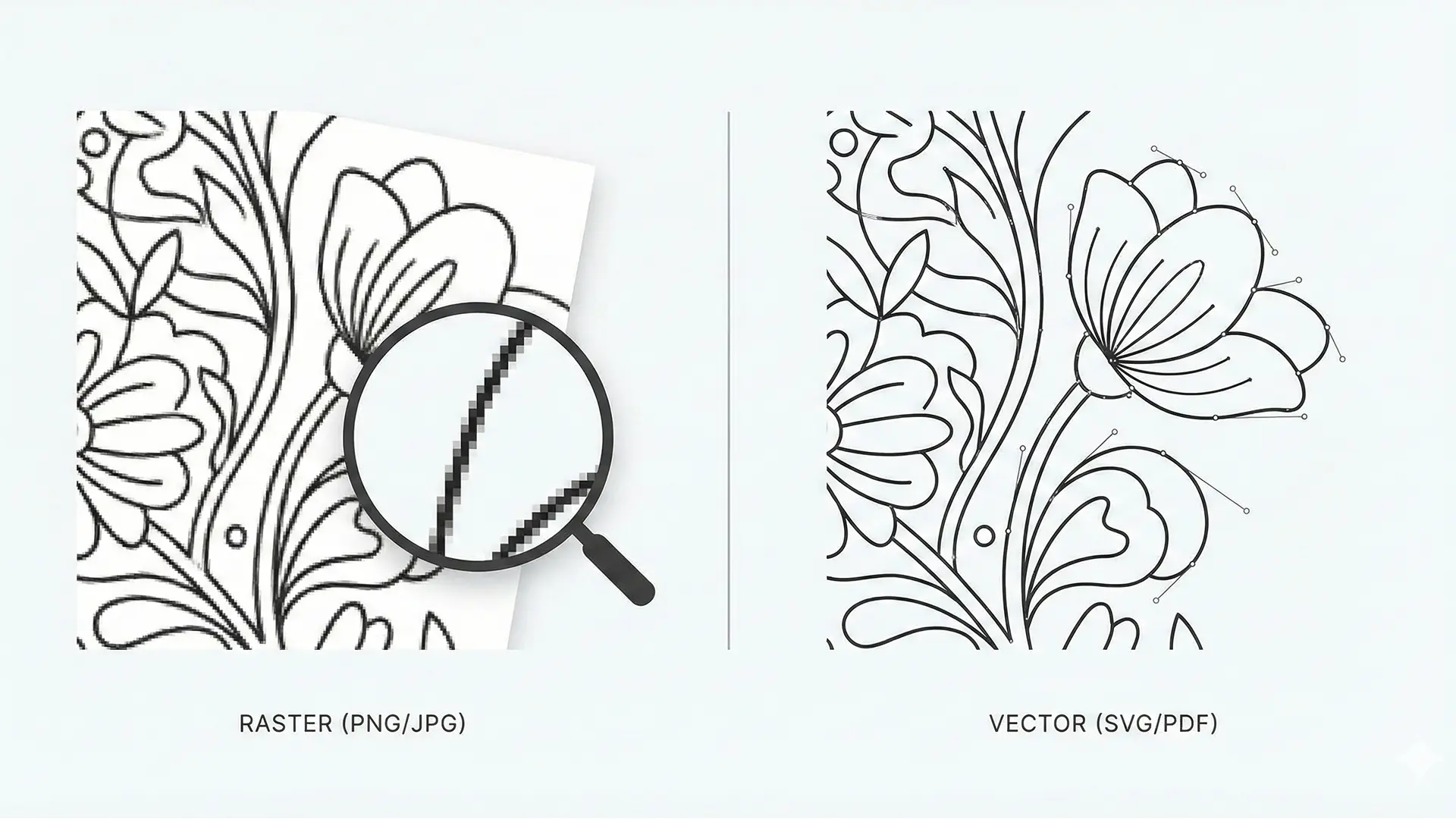
Fixing fuzzy AI art lines for print hero illustration
Turn fuzzy “AI slop” into professional coloring book pages by understanding the difference between raster and vector formats. This guide provides a definitive workflow to vectorize AI art, meet the 300 DPI standard, and export print-ready files for KDP.
1.0 The Root of the Problem: Raster vs. Vector
The “fuzzy line” issue—often referred to as “AI slop”—stems from a fundamental misunderstanding of digital image formats. To produce a high-quality printed product, choosing the right format is a strategic necessity.
Most AI generators create Raster images because they build images pixel-by-pixel, which is great for digital screens but poor for print scaling. When these low-res images are stretched to fit a book page, the software interpolates the missing data, resulting in a blurry, blocky mess.
1.1 Core Concepts Compared
| Feature | Raster Graphics (JPG, PNG) | Vector Graphics (SVG, PDF) |
|---|---|---|
| Fundamental Unit | Pixels (tiny colored squares) | Mathematical paths |
| Scalability | Loses quality/blurs when enlarged | Infinitely scalable without loss |
| Best For | Digital photos, complex paintings | Coloring book line art, Logos |
| The Risk | Digital mud / Pixelation | Crisp, clean lines |
2.0 The Print Quality Standard: Mastering DPI
For platforms like Amazon KDP, understanding Dots Per Inch (DPI) is non-negotiable.
- What is DPI? It measures the density of ink dots a printer places in one inch. Higher DPI means sharper details.
- The 300 DPI Rule: Uploading anything less than 300 DPI is guaranteed to produce a blurry, amateur product.
However, the superior workflow bypasses this constraint entirely by converting artwork into vectors, which are resolution-independent.
3.0 The Solution: Vectorizing Your AI Line Art
The definitive solution to fuzzy lines is Vectorization—converting pixel-based images into mathematical paths.
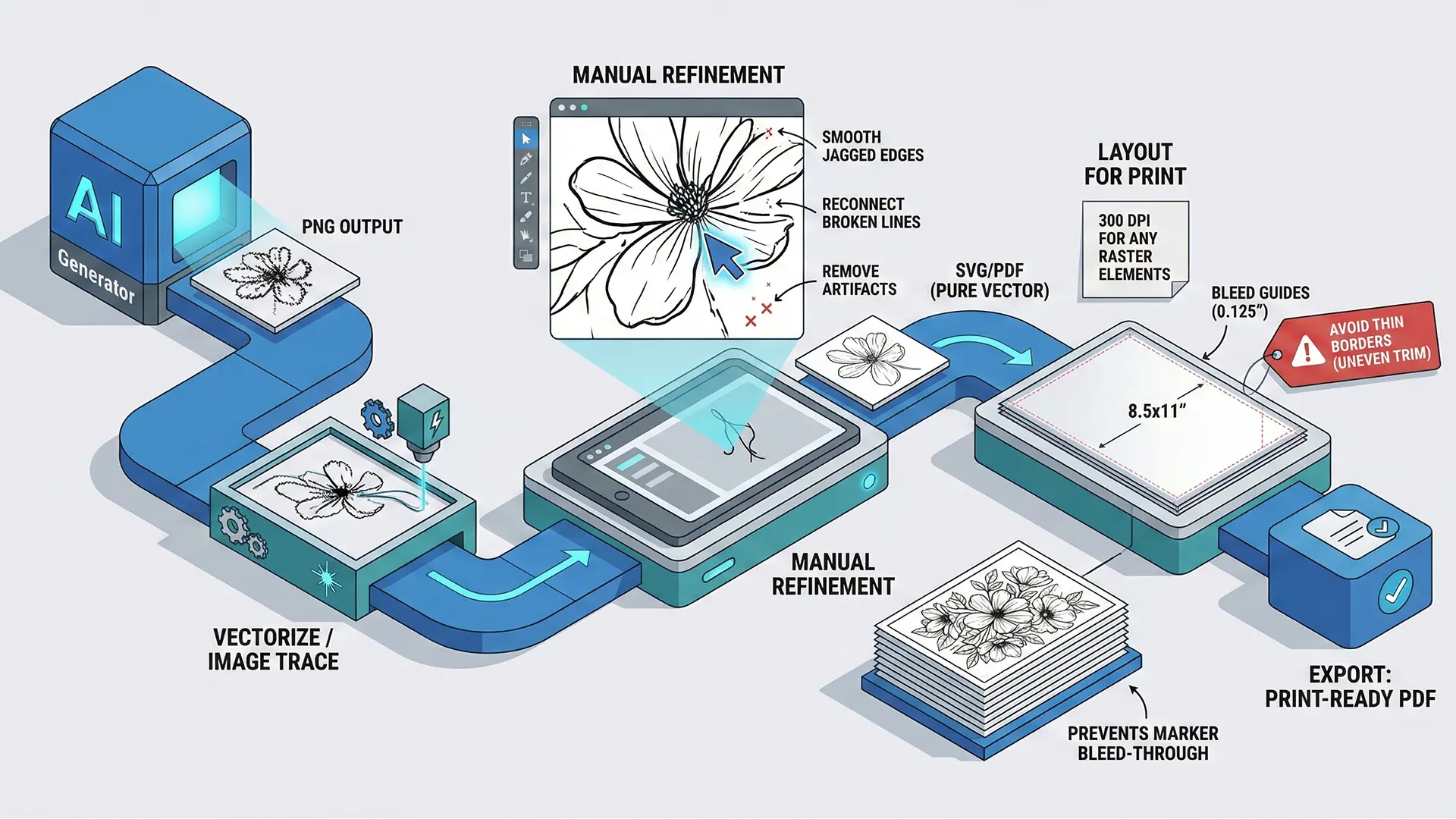
AI art vectorization workflow diagram
3.1 Step-by-Step Guide to Clean Lines
Follow this workflow to distinguish your work from amateur efforts:
- Generate & Select: Start with AI images that have clear, well-defined lines to ensure better vector results.
- Choose the Right Tool: Use industry-standard software like the Affinity Suite (Designer/Photo) or Adobe Illustrator.
- Automated Image Trace: Use the software’s “vectorize” or “auto-trace” function to detect edges and convert them to paths.
- Refine (Critical Step): Manually inspect the paths. Smooth out jagged edges, connect broken lines, and delete digital artifacts to make the art look intentionally hand-drawn.
- Export: Save the final artwork as SVG or PDF to maintain resolution independence.
4.0 Assembling Your Print-Ready Coloring Book
Creating the art is only half the battle; assembling the file correctly is the final checkpoint for professionalism.
4.1 Bleed and Dimensions
Bleed extends artwork beyond the trim edge to prevent ugly white slivers if the printer cuts the paper slightly off-center.
- Standard Size: For an 8.5” x 11” book, your file with bleed must be 8.625” x 11.25”.
- Resolution: Even with vector lines, ensure any raster background elements meet the 300 DPI standard.
4.2 Layout Best Practices
- Avoid Borders: Do not design pages with thin printed borders. Mechanical trimming variations will make them look uneven and amateur.
- Prevent Bleed-Through: Place each design on its own page and leave the reverse side blank. This prevents marker ink from ruining the next design.
- Final Export: Export the entire book interior as a single high-quality PDF for upload.
5.0 Conclusion
The journey from “AI slop” to a high-value product isn’t about finding a magic tool, but mastering a professional workflow. By converting raster art to vectors and meticulously managing bleed settings, you build a brand that commands higher prices and stellar reviews.
Quick Checklist (Fuzzy Line Fix)
- Diagnosis: Confirmed the image is currently a Raster (JPG/PNG) causing pixelation.
- Vectorization: Used “Image Trace” in Illustrator or Affinity Designer.
- Cleanup: Manually smoothed jagged edges and removed artifacts.
- Canvas Setup: Set page size to 8.625” x 11.25” (for 8.5x11 books) to include bleed.
- Final Export: Exported interior as a single high-quality PDF.